Dev tip: Cloudflare tunnels to show previews
Sep 20, 2026
The hard part of a small project has stopped being the building. It's the twenty minutes between it works on my machine and here, look.
You know the options. Deploy it — commit, push, wait for a build, discover an environment variable is missing, push again. Share your screen, where they can watch but not touch, and the demo lives or dies on your narration. Or send a screenshot, which is a picture of an idea rather than the idea.
Each of those is small. But they're just large enough that you often don't bother, and the thing stays on your laptop, and the feedback you would have gotten never arrives.
One command
cloudflared tunnel --url http://localhost:3000
That prints a URL. Send the URL. The person opens it and is using the thing running on your machine, right now, with whatever you changed thirty seconds ago.
No account, no domain, no configuration. The thing you already have running becomes a thing someone else can click.
Why nothing has to be opened
The part worth understanding is why this doesn't require touching your router or your firewall.
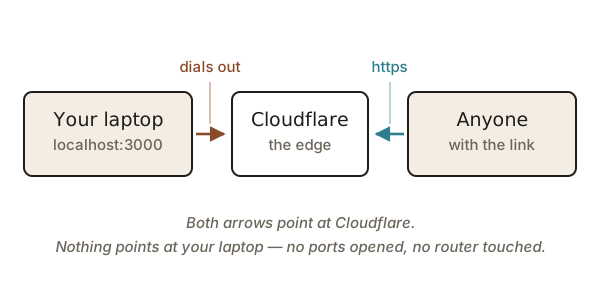
The connector on your machine makes an outbound connection to Cloudflare and holds it open. Visitors connect to Cloudflare too. Cloudflare passes their requests back down the connection your laptop already opened.
Both arrows point inward. Nothing on the internet is ever pointed at your machine, which is why there's nothing to configure and nothing listening that wasn't already.
What it changes
The obvious use is debugging a webhook or testing on a phone. The better one is feedback.
Feedback on something a person can click is different in kind from feedback on a description of it. Describe your idea and people respond to the description — usually generously, which is worse than useless. Hand them a URL and within ten seconds they've found the thing that doesn't work, because they went and pressed the button you forgot about.
A quick tunnel is deliberately disposable: the URL is random, it changes every time, and it dies when you close the terminal. That's the right shape for showing someone. If you want something that persists, you point a named tunnel at your own domain and it stops being a demo and starts being infrastructure.
But most of the value is in the disposable version. Lower the cost of showing your work and you do it more often, and doing it more often changes what you end up building.